

SenPlayer - Media Player
Entertainment
56.39 MB



iPhone、iPad、iPod touch
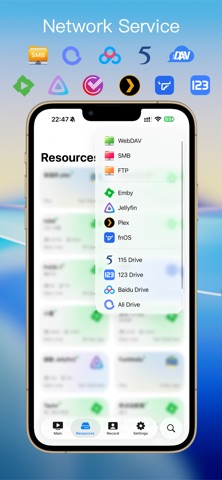
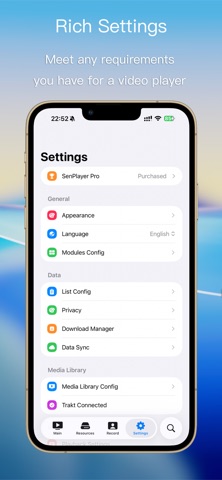
SenPlayer is a powerful all-in-one multimedia player featuring Apple's native rendering engine. It supports 4K/8K ultra-HD video, 120fps high frame rate playback, and HDR standards like HDR10, HDR10+, and HLG, delivering a cinematic audiovisual experience. Whether playing local files or streaming cloud content, SenPlayer ensures buttery-smooth decoding performance. ▶ Multiple Video Sources Play local files or stream via WebDAV, SMB, FTP, and popular cloud services like 115 Cloud, Aliyun Drive, and Baidu Netdisk. Import or subscribe to M3U, M3U8, TXT IPTV playlists. ▶ Powerful Media Library Supports Plex, Emby, Jellyfin, Feiniu, and other media servers with multi-server backup support. Unified search with quality-based sorting. Auto-launch your favorite media library upon opening the app. ▶ Cross-Device Sync Tracks watch history and progress, allowing seamless playback resumption across devices. Sync playback records from cloud drives, NAS, and media servers—start watching on your phone, continue on TV or Mac. Add servers, IPTV, or URL resources on one device, and they’ll auto-sync everywhere. ▶ Custom Gesture Controls Long-press: Variable playback speed (different speeds for left/right screen halves). Double-tap: Skip forward/backward or pause. Pinch & drag: Zoom, reposition, or reset the video (removes black bars). Edge swipe: Adjust brightness (left) and volume (right). Haptic feedback during scrubbing. ▶ Blu-ray Disc Support Play ISO Blu-ray discs with smooth decoding and chapter selection (main feature, extras, trailers, interviews). Experience lossless quality, ultra-high bitrates, and pristine details. ▶ Enhanced Subtitles Search across multiple subtitle sites or load local SRT, ASS, VTT, SSA files. Adjust size, position, timing, and enjoy HDR subtitle optimization. ▶ Cast Anywhere with DLNA Cast from cloud drives, NAS, or media libraries to TVs—perfect for hotel stays. ▶ Skip Intros & Credits Set custom skip durations per folder/show. Auto-detects intro/outro markers from Emby servers. ▶ Media Favorites Bookmark videos/folders from local, cloud, or NAS—synced across devices. ▶ Picture-in-Picture (PiP) Watch in PiP while browsing or chatting. Auto-plays next episode. ▶ Sleep Timer Stop after current video or set a countdown—no more drained batteries. ▶ Audio-Only Mode Background playback with screen off—great for "work-time binge-watching." ▶ Independent Brightness Adjust playback brightness without affecting system settings. ▶ Privacy Protection App lock via password, Face ID, or fingerprint. Encrypt "study materials" in a Private Vault (exit by shaking phone). Blurs background to prevent snooping. ▶ Real-Time OSD Overlay Displays time, FPS, network speed, playback progress, CPU usage, battery, and more. ▶ All-Format Compatibility Video: MP4, MKV, VOB, BIK, DAT, TS, MTS, M2T, M2TS, MPG, MPEG, AVI, RMVB, FLV, SWF, WEBM, 3GP, MOV, ISO, etc. Audio: MP3, FLAC, AAC, WMA, APE, M4A, WAV, DFF, DSF, etc. Images: JPEG, PNG, GIF, WEBP, BMP, HEIC, etc.
What's New
【Brand New 3.0 Playback Engine】 Added: Native Dolby Vision + Dolby Atmos support HDMI/AirPlay casting support, with danmaku and full-screen no-UI border mode (iOS) AI frame interpolation, AI super-resolution, and SDR-to-HDR conversion (supported on select devices) Real-time adjustment of primary and secondary subtitle styles during playback Audio upmixing (2.0-channel to 5.1-channel) (TV) Dolby P7 to Dolby P8.1 conversion support Traditional/Simplified Chinese subtitle conversion Continuous fast-forward and rewind during playback Danmaku year matching support Danmaku API validity detection File type filtering in folder browser Fixed: Fixed color issue in Dolby P5 file thumbnails and added screenshot support Fixed failure to play certain UDP network streams (Mac) Fixed duplicate file issue in cloud drive/NAS playlists Fixed issue where some WebDAV media files could not be opened Fixed search page not displaying cloud drives (iPadOS 27) Optimized: Spatial audio support across all Apple devices Subtitle rendering performance and frame rate improvements Danmaku loading optimization in certain scenarios Resolved 2-second control latency when connecting to HomePod (TV) New disk caching solution with segmented cache support for smoother playback on weak networks Fast-forward/rewind now refreshes the screen during pause "Continue Watching" now shows only the latest episode's playback progress for a given show in the general module Improved traditional Chinese text translation for certain parts
SenPlayer - Media Player latest version 6.1.8 ipa
ipa version 6.1.8 ·2026/09/04
Information
- Size
- 56.39 MB
- Language
- AR、EN、FR、DE、HI、ID、IT、JA、KO、FA、PL、PT、RU、ZH、ES、TH、ZH、TR、VI
- Provider
- Hangzhou Yuesen Vision Technology Co., Ltd.
- Category
- Entertainment
- Age Rating
- 4+
- Price
- Free
- Bundle ID
- com.wuziqi.SenPlayer
- Region
- US
- Compatibility
-
iPhone
Requires iOS 16.4 or later.
iPad
Requires iPadOS 16.4 or later.
iPod touch
Requires iOS 16.4 or later.
All Versions
-
SenPlayer - Media Player - v6.1.8
2026/09/03 · 56.39 MB · Full Access Version
SenPlayer - Media Player-v6.1.8.ipa Download - IPA Resource Site - Online Extract
No more versions
You Might Also Like
Swipe left for more apps

iTerminal - SSH Telnet 工具
CN · 19.72 MB · iOS 13.0+

iQIYI - Dramas Anime Shows
US · 69.00 MB · iOS 15.0+

Conflux - Video Player
CN · 32.71 MB · iOS 16.0+


雷速体育-足球篮球体育赛事比分直播
CN · 159.55 MB · iOS 12.0+

Solitaire-Classic Deluxe Cards
US · 123.70 MB · iOS 15.6+

洪恩编程-趣味编程益智好帮手
CN · 335.74 MB · iOS 10.0+

代练猫-找大神代你上分陪练查价平台
CN · 10.92 MB

Zen Jigsaw
US · 117.33 MB · iOS 10.0+

同城约-附近漂流瓶陌生人交友
CN · 60.55 MB


Offline Games No WiFi internet
US · 190.67 MB · iOS 15.0+

囧次元:动漫大全Pro - 专业版本海量动漫在线看
CN · 5.02 MB

快音Kuaiyin-车载音乐抖快神曲大全
CN · 43.51 MB · iOS 12.0+

游戏电竞大亨-开罗模拟职业玩家经理
CN · 29.69 MB

丰修工程师-手机家电维修接单平台
CN · 12.09 MB · iOS 26.0+


Firsty The Global Network
US · 91.02 MB · iOS 15.6+

美的美居-智慧生活可以更美的
CN · 101.92 MB · iOS 13.0+

