DevLocation
ユーティリティ/開発ツール
3.57 MB
iPhone、iPad、iPod touch
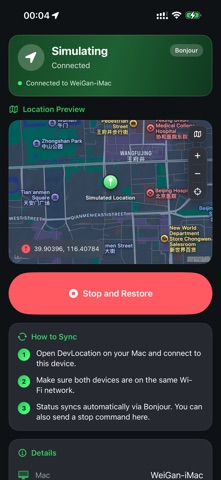
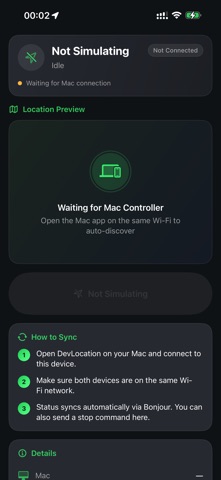
DevLocation is a location simulation and GPS debugging tool for iOS developers. From Mac, simulate a single coordinate or a continuous route on an iPhone with Developer Mode enabled, so you can test maps, navigation, and location-based features on a real device. For development and functional testing only. Enable Developer Mode, connect with USB, and tap Trust. Follow local laws and the Apple Developer Agreement. FEATURES • Single-point mode: pick a map location, search an address, or enter coordinates • Route mode: set start, via, and end points, then simulate walk, run, cycle, or drive • Speed and GPS jitter: adjust speed and add slight jitter to test accuracy logic • GPX import and export: reuse tracks or save the current route • Follow roads: optionally generate road-aligned paths • Favorites and history: save places and routes, replay previous sessions • Mac and iPhone companion: sync on the same network; stop and restore from iPhone • Shortcuts: set or stop location simulation on Mac HOW TO USE ON IPHONE The iPhone app is a companion. It shows status and lets you stop and restore. Simulation is started from Mac. 1. Install and open • Install DevLocation on an iPhone with Developer Mode enabled • Allow local network access to find the Mac on the same Wi-Fi 2. Pair with Mac • Open DevLocation on Mac, connect this iPhone with USB, tap Trust, and connect • Keep both devices on the same Wi-Fi • Status syncs automatically; the home screen shows the Mac name 3. Monitor a session • The header shows Simulating or Idle, plus connection health • Location Preview marks the coordinate; change map style, zoom, or recenter • Details lists device, mode, speed, coordinates, and last update 4. Stop and restore • While simulating, tap Stop and Restore • iPhone tells Mac to end the session and restore real location • The button is disabled when idle 5. Tips • Use Mac to pick points, build routes, and start • Use iPhone to confirm on device or to stop quickly • If status does not update, check the same network and keep the Mac app open NOTES • Developer Mode is required • Use only on your own development devices to test apps you are developing • Stop and restore when finished • This tool does not bypass system restrictions or misrepresent location for non-development use
What's New
Fix user-reported Bugs.
DevLocation最新バージョン1.0.5 ipa
ipaバージョン 1.0.5 ·2026/09/26
Information
- Size
- 3.57 MB
- Language
- AR、BN、CA、HR、CS、DA、NL、EN、FI、FR、DE、EL、GU、HE、HI、HU、ID、IT、JA、KN、KO、MS、ML、MR、NB、OR、PL、PT、PA、RO、RU、ZH、SK、SL、ES、SV、TA、TE、TH、ZH、TR、UK、UR、VI
- Provider
- Weigan Technology (Shenzhen) Co., Ltd.
- Category
- ユーティリティ/開発ツール
- Age Rating
- 4+
- Price
- Free
- Bundle ID
- com.weigantech.DevLocation
- Region
- JP
- Compatibility
-
iPhone
Requires iOS 18.0 or later.
iPad
Requires iPadOS 18.0 or later.
iPod touch
Requires iOS 18.0 or later.
すべてのバージョン
-
DevLocation - v1.0.5
2026/10/07 · 3.57 MB · フルアクセスバージョン
DevLocation-v1.0.5.ipaダウンロード - ipaリソースサイト - 抽出
No more versions
You Might Also Like
左にスワイプして他のアプリを見る

CarTV - 车机投屏视频播放器·车载影院·看电影神器
CN · 19.81 MB · iOS 18+






趣味悬赏-手机兼职项目、众人帮赏金、日结赚钱副业
CN · 18.89 MB · iOS 12.0+




Music | Bowers & Wilkins
US · 26.48 MB · iOS 15.0+


abLive - 视频解析实况Live、动态壁纸、水印工具
CN · 51.08 MB · iOS 15.6+


Portacapture Control
CN · 11.24 MB · iOS 12.0+