爱笔思画X
图形与设计/娱乐
47.27 MB
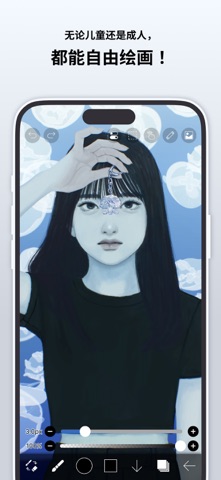




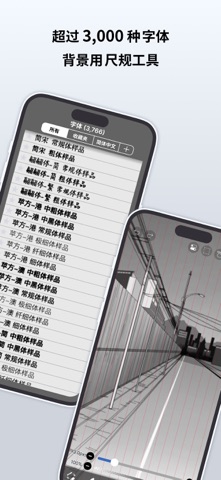
iPhone、iPad、iPod touch
献给全世界渴望轻松享受绘画与动画创作的你。 ibisPaint X 是一款系列累计下载量突破 5 亿次、可在智能手机和平板电脑上使用的专业插画・动画制作应用。 "画画好像很难"——这款应用正是为有这种想法的你而生。即使是免费版,也能获得毫不妥协的创作体验;操作简单明了,无需摸索即可上手;而且越用越顺手,令人安心。ibisPaint X 始终是每个人都能轻松开始"画画"的入口,同时不断拓展创作的可能性——从一张插画到逐帧动画,再到配有背景音乐和音效的视频。 搭载 13 万种以上画笔、30,000 件以上素材、3,000 种以上字体、86 种图像处理滤镜、46 种网点纸、27 种图层混合模式,以及矢量工具、参照窗口、放射线尺・对称尺、动态滤镜、AI 学习干扰功能等,专业程度不输电脑绘图软件。不仅可以画插画,还能进一步制作动画,甚至将创作过程录制为延时视频并加以分享,一站式尽享创作乐趣。无论年龄、国籍、经验如何,都深受全世界用户的喜爱。 *绘画教程 YouTube 频道 我们发布了大量关于如何善用爱笔思画的视频,欢迎订阅! https://youtube.com/ibisPaint *支持的触控笔 https://ibispaint.com/stylus/supported_digital_stylus.jsp?platformType=1 *购买方案说明 https://ibispaint.com/lecture/index.jsp?no=26 ※如未在免费试用结束前至少 24 小时取消自动续订,将在续订时自动扣费。 【关于应用访问权限】 本应用可能会基于提供服务及提升易用性的目的,访问设备的各项功能。使用本应用并非必须开启任何访问权限,以下权限均为可选权限。用户可以不同意这些可选权限。即使拒绝授权,本应用的基本功能仍可继续使用,但需要相应权限的部分功能可能会受到限制。 •照片图库中的图片・视频 用于导入作品文件和图片,以及保存所制作的作品文件、图片和视频 •麦克风语音输入 用于与触控笔等受支持的外部设备进行连接和通信 •蓝牙通信 用于与触控笔等受支持的外部设备进行连接和通信 •推送通知的发送 用于推送作品相关通知、应用更新信息及重要公告 *问题咨询与故障反馈 我们无法回复评论区中的咨询或故障反馈,敬请通过以下支持窗口联系我们。 https://ssl.ibis.ne.jp/en/support/Entry?svid=25 *ibisPaint 服务使用条款 https://ibispaint.com/agreement.jsp
新功能
Thank you for using ibisPaint X! The summary of this update is as follows. [Improvements, Changes] - Added a keyboard shortcut for opening and closing the Shape Tool window. [Fixed Bugs and Problems] - Fixed an issue where the scroll position would return to the top when adding or deleting a layer in the Floating Layer Window. [New Features in ver. 14.1.0] - Added the ability to customize Stabilizer and Force Fade settings individually for each brush. - Added two Real time stabilization modes: Constant and Fast Strokes. - Improved the brush tool’s stroke-tracking responsiveness and made the fade length consistent. You can return to the previous drawing feel from the Settings window via "Brush Prediction" . You can also configure this per brush with the brush parameter “Disable Prediction”. - Added the brush parameters "Fade Start Time" and "Fade End Time". - Added the ability to add audio to animation artworks. - Added keyboard shortcuts for playing/stopping an animation and for adding and deleting clips in animation artworks. - Added a "3D Layer" feature that lets you place 3D materials. - Added a “Smart Shapes” feature that automatically corrects freehand drawings into “straight lines,” “Bézier curves,” and other shapes. - Added "Relief HQ" filter to "Style" filter category. - Added "Smart Credits" — a points system required to access some of the advanced features in ibisPaint (referred to as "Smart Features"). Credits can be purchased from each Smart feature, and your balance can be viewed in the Settings window. - Added keyboard shortcuts for actions such as displaying the ruler and adding vector layers. - Added keyboard shortcuts to switch between custom brushes. - Added a "Solo Mode" feature that displays only the specified layer. - Added a Premium feature that moves deleted artworks to “Recently Deleted Artworks” and retains them for 30 days. - Added "Oil Paint" filter to "Artistic" filter category. - Enhanced the Trim feature. You can now enter Position, Width, and Height as numerical values, specify a crop area that extends beyond the original canvas, and trim while rotating the canvas. - You can now undo and redo adjustments while using the Transform Tool. - The mouse cursor now changes depending on the situation. This setting can be changed in the "Cursor" section of the Settings window. - When using a stylus with hover functionality, the cursor is now displayed at the hover position. This setting can be changed in the "Cursor" section of the Settings window. - Improved the design of rulers to be less obtrusive while drawing, and added the ability to change the ruler color. - Added "Touch History Completion", which captures more touch points (enable from the Settings window). [New Features in ver. 14.0.8] - Added a feature to protect artworks using Yuify. [New Features in ver. 14.0.6] - You can now install brushes from the install button on ibispaint.com brush pattern artwork pages, even when the page is opened in an external browser.
爱笔思画X最新版本14.1.0 ipa
ipa版本 14.1.0 ·2026/09/11
信息
- 大小
- 47.27 MB
- 語言
- AR、NL、EN、FR、DE、HE、HI、ID、IT、JA、KO、PT、RU、ZH、ES、TH、ZH、TR、VI
- 供應商
- ibis inc.
- 類別
- 图形与设计/娱乐
- 年齡分級
- 4+
- 價格
- 免費
- Bundle ID
- jp.ne.ibis.ibisPaintX
- 地區
- 國區
- 兼容性
-
iPhone
設備需裝有 iOS 15.0 或更高版本。
iPad
設備需裝有 iPadOS 15.0 或更高版本。
iPod touch
設備需裝有 iOS 15.0 或更高版本。
全部版本
-
爱笔思画X - v4.2.2
2026/04/26 · 47.27 MB · 全權限版本
爱笔思画X-v4.2.2.ipa下載 - ipa資源站 - iosipa在線提取下載 -
爱笔思画X - v14.1.0
2026/09/08 · 76.00 MB · 全權限版本
爱笔思画X-v14.1.0.ipa下載 - ipa資源站 - iosipa在線提取下載 -
爱笔思画X - v14.0.9
2026/08/25 · 48.35 MB · 全權限版本
爱笔思画X-v14.0.9.ipa下載 - ipa資源站 - iosipa在線提取下載 -
爱笔思画X - v14.0.1
2026/04/26 · 47.17 MB · 全權限版本
爱笔思画X-v14.0.1.ipa下載 - ipa資源站 - iosipa在線提取下載 -
爱笔思画X - v14.0.6
2026/04/26 · 117.84 MB · 全權限版本
爱笔思画X-v14.0.6.ipa下載 - ipa資源站 - iosipa在線提取下載 -
爱笔思画X - v14.0.2
2026/04/26 · 113.88 MB · 全權限版本
爱笔思画X-v14.0.2.ipa下載 - ipa資源站 - iosipa在線提取下載 -
爱笔思画X - v14.0.0
2026/04/26 · 111.45 MB · 全權限版本
爱笔思画X-v14.0.0.ipa下載 - ipa資源站 - iosipa在線提取下載 -
爱笔思画X - v13.1.18
2026/04/26 · 110.62 MB · 全權限版本
爱笔思画X-v13.1.18.ipa下載 - ipa資源站 - iosipa在線提取下載 -
爱笔思画X - v13.1.17
2026/04/26 · 47.48 MB · 全權限版本
爱笔思画X-v13.1.17.ipa下載 - ipa資源站 - iosipa在線提取下載 -
爱笔思画X - v13.1.16
2026/04/26 · 47.48 MB · 全權限版本
爱笔思画X-v13.1.16.ipa下載 - ipa資源站 - iosipa在線提取下載 -
爱笔思画X - v13.1.13
2026/04/26 · 47.48 MB · 全權限版本
爱笔思画X-v13.1.13.ipa下載 - ipa資源站 - iosipa在線提取下載
你可能還喜歡
左滑顯示更多應用


MyFollowers - Unfollow Tracker
美區 · 21.97 MB · iOS 16.0+



AdBlocker Pro Safari浏览器广告拦截器
國區 · 17.39 MB · iOS 12.2+


BT教育-CPA初中级会计职称税务保荐人备考课程题库
國區 · 60.25 MB · iOS 14+

Lucky Play Casino Slots Games
美區 · 65.62 MB · iOS 12.0+


QuickQ - Official quickqio
美區 · 92.01 MB · iOS 13.0+