DevLocation
ユーティリティ/開発ツール
3.57 MB
iPhone、iPad、iPod touch
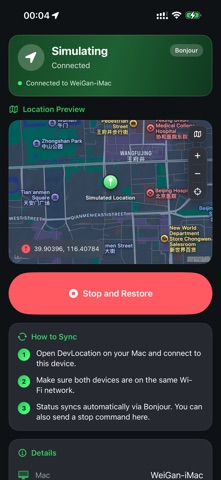
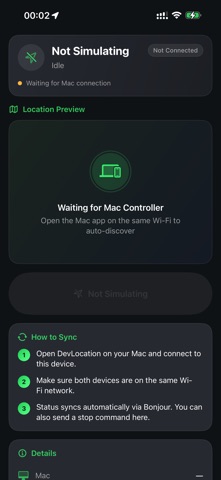
DevLocation is a location simulation and GPS debugging tool for iOS developers. From Mac, simulate a single coordinate or a continuous route on an iPhone with Developer Mode enabled, so you can test maps, navigation, and location-based features on a real device. For development and functional testing only. Enable Developer Mode, connect with USB, and tap Trust. Follow local laws and the Apple Developer Agreement. FEATURES • Single-point mode: pick a map location, search an address, or enter coordinates • Route mode: set start, via, and end points, then simulate walk, run, cycle, or drive • Speed and GPS jitter: adjust speed and add slight jitter to test accuracy logic • GPX import and export: reuse tracks or save the current route • Follow roads: optionally generate road-aligned paths • Favorites and history: save places and routes, replay previous sessions • Mac and iPhone companion: sync on the same network; stop and restore from iPhone • Shortcuts: set or stop location simulation on Mac HOW TO USE ON IPHONE The iPhone app is a companion. It shows status and lets you stop and restore. Simulation is started from Mac. 1. Install and open • Install DevLocation on an iPhone with Developer Mode enabled • Allow local network access to find the Mac on the same Wi-Fi 2. Pair with Mac • Open DevLocation on Mac, connect this iPhone with USB, tap Trust, and connect • Keep both devices on the same Wi-Fi • Status syncs automatically; the home screen shows the Mac name 3. Monitor a session • The header shows Simulating or Idle, plus connection health • Location Preview marks the coordinate; change map style, zoom, or recenter • Details lists device, mode, speed, coordinates, and last update 4. Stop and restore • While simulating, tap Stop and Restore • iPhone tells Mac to end the session and restore real location • The button is disabled when idle 5. Tips • Use Mac to pick points, build routes, and start • Use iPhone to confirm on device or to stop quickly • If status does not update, check the same network and keep the Mac app open NOTES • Developer Mode is required • Use only on your own development devices to test apps you are developing • Stop and restore when finished • This tool does not bypass system restrictions or misrepresent location for non-development use
新功能
Fix user-reported Bugs.
DevLocation最新版本1.0.5 ipa
ipa版本 1.0.5 ·2026/09/26
信息
- 大小
- 3.57 MB
- 語言
- AR、BN、CA、HR、CS、DA、NL、EN、FI、FR、DE、EL、GU、HE、HI、HU、ID、IT、JA、KN、KO、MS、ML、MR、NB、OR、PL、PT、PA、RO、RU、ZH、SK、SL、ES、SV、TA、TE、TH、ZH、TR、UK、UR、VI
- 供應商
- Weigan Technology (Shenzhen) Co., Ltd.
- 類別
- ユーティリティ/開発ツール
- 年齡分級
- 4+
- 價格
- 免費
- Bundle ID
- com.weigantech.DevLocation
- 地區
- 日區
- 兼容性
-
iPhone
設備需裝有 iOS 18.0 或更高版本。
iPad
設備需裝有 iPadOS 18.0 或更高版本。
iPod touch
設備需裝有 iOS 18.0 或更高版本。
全部版本
-
DevLocation - v1.0.5
2026/10/07 · 3.57 MB · 全權限版本
DevLocation-v1.0.5.ipa下載 - ipa資源站 - iosipa在線提取下載
沒有更多版本了
你可能還喜歡
左滑顯示更多應用







Supermarket Simulator Games 3D
國區 · 121.18 MB


WordUp - 英语单词天天记
國區 · 26.76 MB · iOS 15.6+